I'm still here, I've just been off-line for quite a few days. The little computer that I'd been using from 2001 had a screen blow-out a couple weeks ago, rendering it quite useless for internet use until the bulb was replaced.
Prior to this, I determined that there is a goldfish file living on it. Yes, you read correctly, a goldfish file. You know how a goldfish will grow to fill it's bowl, no matter how long it takes? I have a file that does the same thing, and I'll be dipped if I know what it is or how to stop it.
The little computer only has about 8 gig of hard drive on it's C sector, where the Windows program is. When it first came out, 8 gig was *huge*, surely we'd never run out of room, but that was 7 years ago. Lots of programs need that much space all by themselves, and we won't talk about how much room the digital scrapbooking is taking up.
We're running Windows XP, with Service Pack 1 on it. Many of the newer programs require Service Pack 2, but there isn't enough room to install it. I went in and cleaned out *everything* that wasn't essential for the computer to run, and moved as much over to the secondary drive as I could, which freed up enough space to install Service Pack 2. I called it a night at that point, planning to download and install SP2 the next day. When I checked the computer the next day, there was less than 200 meg of free space left, dangerously low. The night before, I had it up over a gig. Grrrrr..... somewhere, overnight, something filled up my hard drive, and I can't find it.
Soooo, as I'm pondering what on earth to do about the space dilemma (caused by virusi, I believe), the screen starts flickering, the first signs of the backlight dying. Things to consider - 1) I'm running a computer with very little hard drive space, and probably not quite enough processing power to run some of the newer programs out there, 2) It has a stinkin' goldfish living on it, 3) the case is broken and the keyboard is trying to pop out, 4) the screen is held in with duct tape (I kid you not on this), and 5) the screen is dying. Short of upping the processor, upping the hard drive, wiping the cotton pickin' thing clean and starting over, there isn't much else that *can* be done with the rascal.
Meet my solution, Pinky:
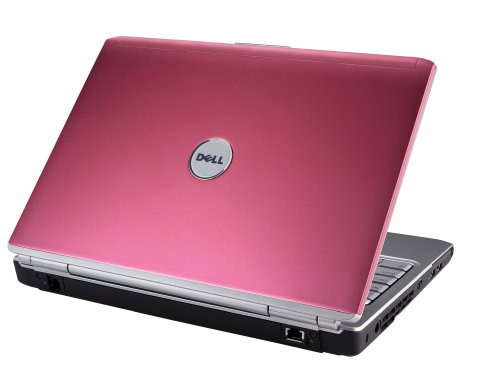
Yes, I did. I ordered a Flamingo Pink Dell laptop, and a matching mouse. I love Dell - I was able to order a brand new computer with Windows XP on it, so my printer will still work. No driver for the Vista stuff. It's not wanting to play well with the other computers, but once I get the network bugs fumigated, I think we'll be just fine.
What's going to happen to the other computer, you ask? Well, the backlight came in today. Once I get everything off of it that I need, Jack is going to format the hard drive and install Linux on it. He's been wanting to do that for ages. Linux is supposed to be pretty much virus proof, and run better than Windows. It doesn't have all of the bells and whistles, but I guess that also means that there is less stuff to blow up on it. It uses Firefox for it's web browser, and has it's own email program. It comes with a productivity suite that imports and exports Microsoft Office documents.
We're going to load it up and see what it'll do. If it works out well, we have a spare computer for the teenager to use when he visits/moves back in. Since Linux is virtually virus-proof, it will be ideal for his browsing habits. I know he doesn't mean to bring in stray bugs, but they breed on the websites he visits.

1 comments:
Well that's just beautiful. Find a matching handbag, and you're all set!
Post a Comment